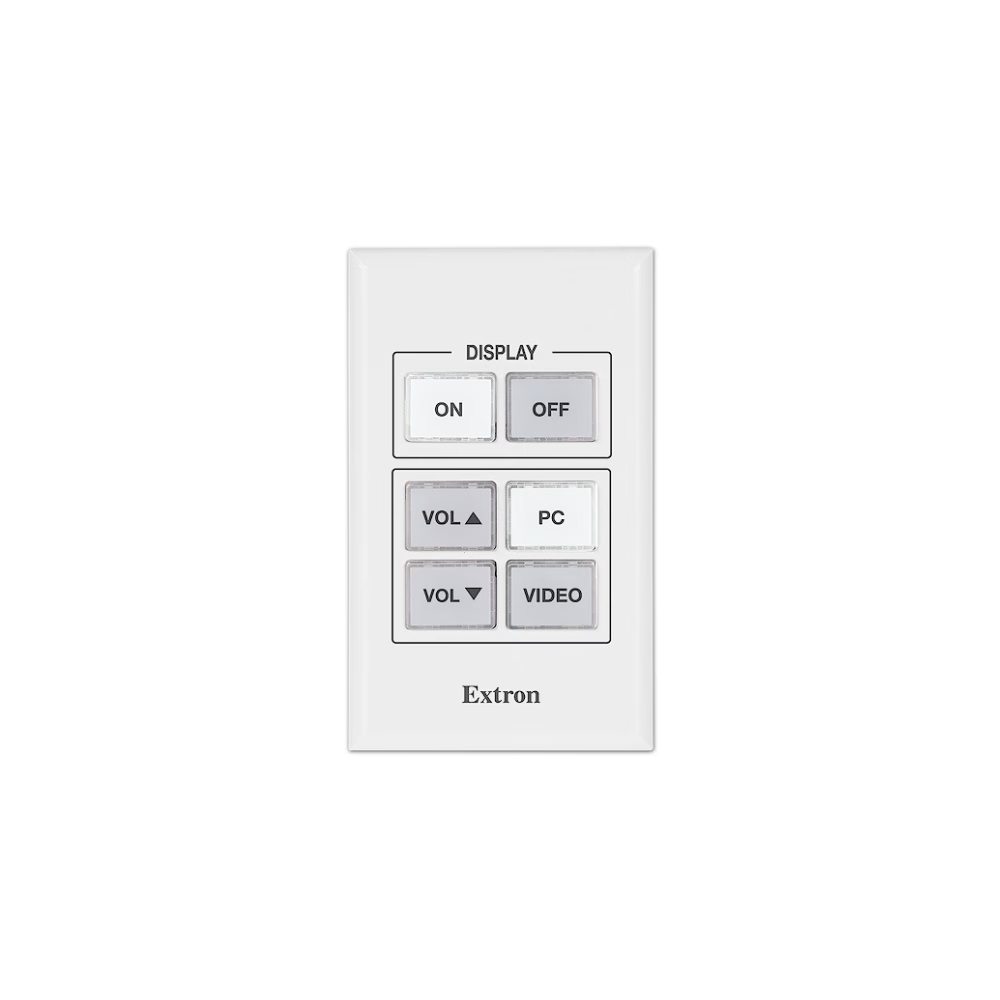
MLC 55 RS – MediaLink Controller with RS-232 and IR Display Control
Key Features
- Unidirectional RS-232 and IR port for universal display control
- Discrete ON and OFF display power controls
- Configurable buttons
- Dual color, backlit buttons can be labeled for easy identification
- Removable button caps
- Section 508 Compliant
| MLC 55 RS | |||
| Communication — host port | |||
|---|---|---|---|
| USB host port | USB mini B, front panel behind faceplate | ||
| USB standards | USB 2.0, low speed | ||
| IR learning frequencies | 30 kHz to 300 kHz | ||
| IR learning distance | 4″ (10 cm) to 14″ (36 cm) from the receiver | ||
| Program control | Extron MLC 55, 62 and 64 Series Configuration Program for Windows® Extron Simple Instruction Set (SIS™) | ||
| Communication — serial port | |||
| Serial control port | (1) 3.5 mm captive screw connector, 2 pole, ground pin shared with IR port, for unidirectional RS-232 control (±5 V) | ||
| Baud rate and protocol (RS-232) | 9600 (default), 19200, 38400, 57600, or 115,200 baud; 8 (default) or 7 data bits; 1 stop bit; no parity (default), or even or odd parity | ||
| Communication — IR port | |||
| IR control port | (1) 3.5 mm captive screw connector, 2 pole, ground pin shared with serial port (transmit only) TTL level (0 to 5 V) modulated infrared control from 30 kHz up to 300 kHz | ||
| General | |||
| Power supply | External Input: 100-240 VAC, 50-60 Hz Output: 12 VDC, 0.5 A, 6 watts | ||
| Power consumption | |||
| Device | 1.1 watts, 12 VDC | ||
| Device and power supply | 1.5 watts, 100-240 VAC, 50-60 Hz | ||
| Ambient temperature/humidity | Storage: -40 to +158 °F (-40 to +70 °C) / 10% to 90%, noncondensing Operating: +32 to +122 °F (0 to +50 °C) / 10% to 90%, noncondensing | ||
| Cooling | Convection, no vents | ||
| Thermal dissipation | |||
| Device | 3.6 BTU/hr | ||
| Device and power supply | 4.9 BTU/hr | ||
| Mounting | Wall or furniture mount Mount in a standard 1 gang US electrical junction box or with included mud ring. | ||
| Enclosure type | Plastic | ||
| Enclosure dimensions | |||
| Faceplate | 4.50″ H x 2.75″ W x 0.30″ D (11.43 cm H x 6.99 cm W x 0.76 cm D) | ||
| Device | 2.81″ H x 1.76″ W x 1.41″ D (7.14 cm H x 4.47 cm W x 3.58 cm D) Fits inside a standard US 1 gang junction box. (Depth includes connectors. Allow enough depth in the junction box for device plus cable clearance.) | ||
 | |||
| Product weight | 0.26 lbs (0.1 kg) | ||
| Regulatory compliance | CE, C-tick, c-UL, UL, FCC Class A, ICES, VCCI Class A Section 508 of the Rehabilitation Act (29 U.S.C. 794d) | ||
| Product warranty | 3 years parts and labor | ||
| Everlast power supply warranty | 7 years parts and labor | ||
| |||
| |||
The Extron MLC 55 RS MediaLink® Controller is an economical, easy-to-use keypad controller for common AV functions such as power, input selection, and volume in single display applications. It features a sleek, new look with beveled edges, rounded corners, and redesigned backlit buttons. The faceplate hides the mounting screws and configuration port, giving the controller a refined, uncluttered appearance. The MLC 55 RS can be mounted in a standard, one-gang junction box, included mud ring, SMB 111 Surface Mount Box, or EWB 101 External Wall Box, allowing the controller to be installed virtually anywhere, including walls, lecterns, or tables. The controller can be configured using the Extron MLC 55,62,64 Series software. The MLC 55 RS is available in white.
Simple, Consistent Control in Every Room
The MLC 55 RS acts as an extended remote control panel, providing user-friendly control for a display's power, input selection, and volume. Because the controller offers a central point of control for a display devices key functions, it eliminates the need for the display's IR remote control, making operations much more efficient. With the MLC 55 RS, there are no misplaced remotes to search for, no confusing menus to navigate, and no dead batteries. No matter what brand of display is installed in each presentation venue, the MLC 55 RS MediaLink Controller always provides a consistent control method from room to room. Presenters with little or no training can walk into any room equipped with a MediaLink controller and operate the AV system with minimal effort.
Configurable Buttons for Flexible Control Options
No programming knowledge is necessary to install the MLC 55 RS MediaLink Controller. The four lower buttons default to Volume Up, Volume Down, Select PC Input, and Select Video Input. Using MLC 55,62,64 Series configuration software these buttons can be configured to send out any RS-232 or IR command supported by the display, making it easy to customize the controller to meet the needs of most single-display AV systems. For example, three of the four buttons could be configured for input selection, with the fourth button dedicated to video mute or auto image. Each button can store up to four separate commands, providing additional flexibility to meet the specific control requirements for most display devices. When a button is configured for Macro mode, all of the stored commands associated with that button are sent with a single button press. In Toggle mode, the button steps through a series of two, three, or four commands, issuing a single command with each press of the button.
Easy to Configure
No programming knowledge is necessary to configure MLC 55 RS MediaLink Controllers. When used with the supplied Windows®-based configuration software, installation files can be saved and used to duplicate additional MLC 55 models. The files can also be archived for later use.
- Extron's easy-to-use MLC 55,62,64 Series configuration software - Provides fast and simple setup via USB when combined with one of many ready-to-use RS-232 or IR device drivers available on the Extron Web site. The configuration program and MLC 55 RS also support IR Learning for creating new IR drivers from the handheld remote of a source or display device.
Mounting Options
The MLC 55 RS can be mounted in a standard, one-gang electrical box or the included mud ring, allowing the controller to be installed virtually anywhere, including walls, lecterns, or tables. Additional mounting options include:
- SMB 111 – Surface Mount Box
- EWB 101 – External Wall Box
Features
- Unidirectional RS-232 and IR port for universal display control — Software selectable IR/Serial port for communicating with virtually any projector or flat panel display.
- Discrete ON and OFF display power controls — Simplify system operations and eliminate the need for a handheld IR display remote.
- Configurable buttons — Can be set up to control display power, input selection, volume, or any other IR/RS-232 command supported by the display.
- Dual color, backlit buttons can be labeled for easy identification — Buttons illuminate red or white for ease of use in low-light environments. Pre-printed label sheets are included.
- Removable button caps — Make it easy to label each button to clearly indicate its function. Labels can be quickly changed in the field and don't require programming or engraving.
- IR learning capability — Capture IR codes from a device’s handheld remote control.
- Thousands of Extron certified, ready-to-use device drivers are available
- Pluggable captive screw connectors — Provide quick and easy connection to the controller for easy installation and troubleshooting.
- Easily accessible, front mount configuration — IR Transceiver, switches, reset button, and mini USB configuration port are strategically located behind the easily removable magnetically-attached faceplate.
- Extron's easy-to-use MLC 55,62,64 Series configuration software provides fast and simple set-up
- Toggle mode — Provides additional flexibility by allowing two different sets of commands to be executed with alternating presses of a button.
- Inactivity timer for display shutoff — Adjustable timer control provides automatic shutdown to preserve energy.
- Front panel security lockout — If the MLC 55 RS is installed in an unsecured environment where easy access is not desirable, a security lockout feature may be implemented to lock out all front panel controls.
- Section 508 Compliant — Meets or exceeds U.S. accessibility standards for Electronic Information Technology. For more information about Extron's Commitment to Accessibility please see our Accessibility Page.
- Flexible mounting options — Utilizing a standard electrical box or included mud ring, the MLC 55 RS can be installed virtually anywhere, including walls, lecterns, or tables.
- Includes a white one-gang, magnetically-attached faceplate — The MLC 55 RS comes with a one-gang, magnetically-attached, high-impact plastic faceplate durable enough for demanding environments.
- Includes one-gang mud ring
- Optional black wall mounting kit available, model MLM 55
- External Extron Everlast™ power supply included — Provides worldwide power compatibility with high‑demonstrated reliability and low power consumption
- Extron Everlast Power Supply is covered by a 7‑year parts and labor warranty