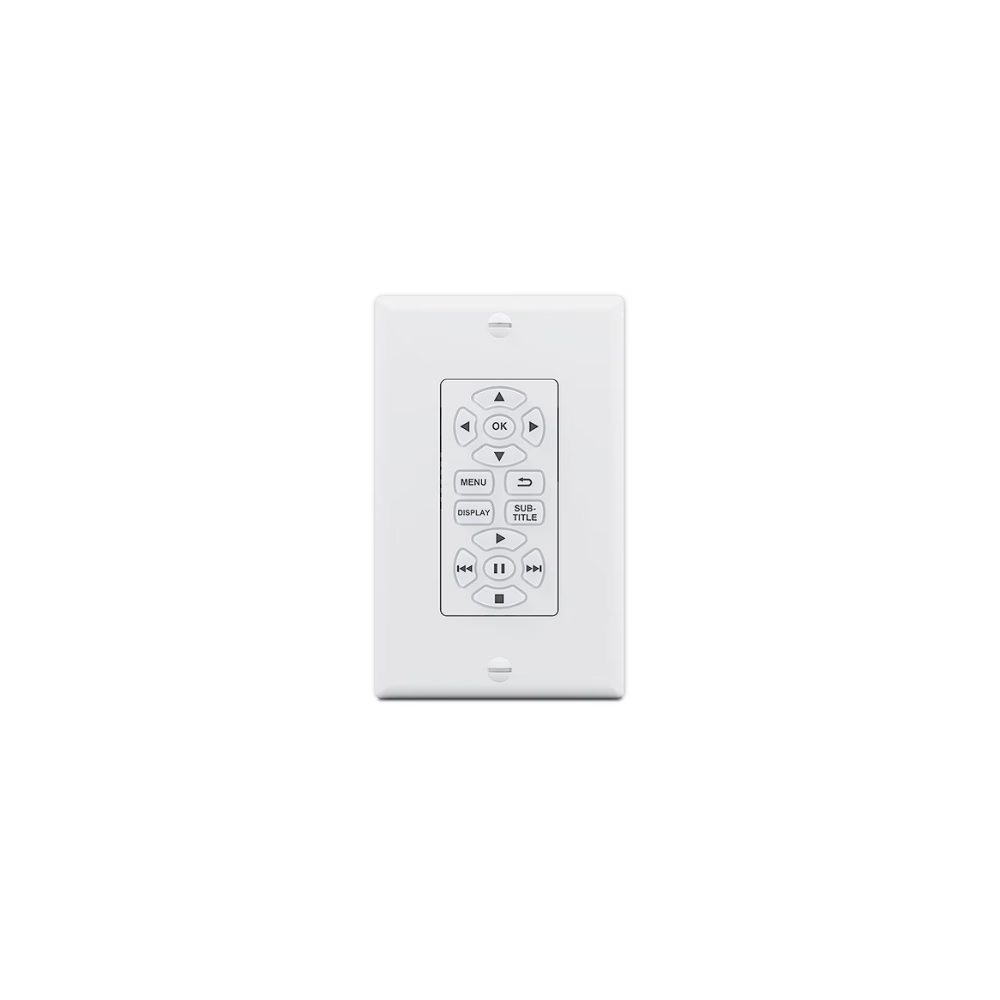
EBP NAV D – eBUS Button Panel with Transport Control – Decorator-Style Wallplate
Key Features
- Fully customizable button panel integrates easily with an Extron Pro Series control system
- Fourteen backlit, soft-touch buttons provide easy, intuitive control of Blu-ray and DVD players, streaming video, and other media sources
- Two eBUS® ports allow for quick system expansion and upgrades
- Compatible with all Extron IPCP Pro control processors
- Use a single button panel or combine multiple button panels to accommodate a broad variety of system designs
- eBUS button panels connect to the control processor and each other using a single cable that carries both power and communication
| EBP NAV D | |||
| eBUS control interface | |||
|---|---|---|---|
| eBUS control ports | (2) 3.5 mm captive screw connectors, 4 pole | ||
| eBUS pin configuration | +V = +12 VDC; +S = + signal; -S = – signal; G = ground | ||
| Recommended cable type | Extron STP20-2/1000 or STP20-2P/1000 cable | ||
| Maximum system cable length | 1000 feet (305 meters) sum total for the eBUS system, regardless of topology. Power injection may be required depending on system cabling topology and primary power supply wattage. See the eBUS® Button Panel Decorator-Style Series Setup Guide or eBUS Technology Reference Guide for details. | ||
| Software and control options | |||
| Configuration software | Global Configurator Plus and Professional | ||
| Programming software | Global scripter | ||
| Control apps | Extron Control | ||
| Utilities | Toolbelt | ||
| General | |||
| Power | 12 VDC (Power is supplied by an Extron IPCP Pro series control processor or optional power supply). | ||
| Power consumption | 1.5 W | ||
| Ambient temperature/humidity | Storage: -40 to +158 °F (-40 to +70 °C) / 10% to 90%, noncondensing Operating: +32 to +122 °F (0 to +50 °C) / 10% to 90%, noncondensing | ||
| Cooling | Convection, no vents | ||
| Thermal dissipation | 3.8 BTU/hr | ||
| Mounting | |||
| Rack mount | No | ||
| Furniture or wall mount | Yes, in a standard US 1-gang electrical junction box or mud ring. | ||
| Enclosure type | Plastic faceplate and high-impact plastic rear enclosure | ||
| Enclosure dimensions | |||
| Faceplate | 4.5″ H x 2.8″ W x 0.4″ D (11.4 cm H x 7.1 cm W x 1.0 cm D) | ||
| Device | 2.7″ H x 1.7″ W x 0.8″ D (6.9 cm H x 4.2 cm W x 2.1 cm D) 2.7″ H x 1.7″ W x 1.25″ D (6.9 cm H x 4.2 cm W x 3.2 cm D) including captive screw connectors (Depth includes faceplate and buttons. Fits most 1 gang US boxes or mud rings. Allow at least 1.35″ [3.43 cm] depth in the wall or furniture for cables.) | ||
 | |||
| Product weight | 0.2 lb (0.1 kg) | ||
| Vibration | ISTA 1A in carton (International Safe Transit Association) | ||
| Regulatory compliance | |||
| Safety | CE, c-UL, UL | ||
| EMI/EMC | CE, C-Tick, FCC Class A, ICES, VCCI class A | ||
| Environmental | Complies with the appropriate requirements of RoHS, WEEE | ||
| Accessibility | Complies with the appropriate requirements of Section 508 of the Rehabilitation Act (29 U.S.C. 794d). | ||
| Product warranty | 3 years parts and labor | ||
| |||
| |||
The Extron EBP NAV D eBUS® button panel is a fully-customizable AV system control interface for Extron eBUS-enabled control systems. This easy-to-use control panel connects to an IPCP Pro control processor to provide transport controls for video sources within a room. The EBP NAV D offers customizable, soft-touch buttons that are backlit for easy operation in low-light environments. Two eBUS ports are available for easy system expansion. eBUS button panels are linked to the control processor and to each other using a single cable that carries both power and communication. The EBP NAV D mounts in a single-gang junction box, and includes black and white decorator-style wallplates and mud ring.
Extron’s integration-friendly eBUS technology is based on a unique digital bus architecture that allows for easy control system expansion, greater design options, and future upgrades. As with our TouchLink® Pro touchpanels, eBUS button panels are designed for use with any Extron IPCP Pro Series control processor. A single eBUS button panel can be used as the AV control interface for a smaller system or multiple button panels and touchpanels may be combined when a more elaborate control system is required.
eBUS button panels come in industry-standard form factors and multiple units may be linked together by a single cable that carries both power and communication. Since they have the same physical appearance as Extron’s broad range of MediaLink® controllers, eBUS button panels can be used alongside them throughout a facility while preserving a consistent look and user experience.
Features
- Fully customizable button panel integrates easily with an Extron Pro Series control system
- Fourteen backlit, soft-touch buttons provide easy, intuitive control of Blu-ray and DVD players, streaming video, and other media sources
- Two eBUS® ports allow for quick system expansion and upgrades
- Compatible with all Extron IPCP Pro control processors
- Use a single button panel or combine multiple button panels to accommodate a broad variety of system designs
- eBUS button panels connect to the control processor and each other using a single cable that carries both power and communication
- DIP switches are used to set unique eBUS device addresses and minimize setup time
- eBUS diagnostic LED provides connection status for troubleshooting
- Video transport controls — Simplifies control of video playback and position while eliminating the need for an external remote.
- Built-in speaker provides audible feedback for button presses
- Removable captive screw connectors allow for quick installation
- Reset Button — Allows firmware to be reset to original factory settings.
- Supports the Extron Control App
- Includes black and white decorator-style wallplates and mud ring